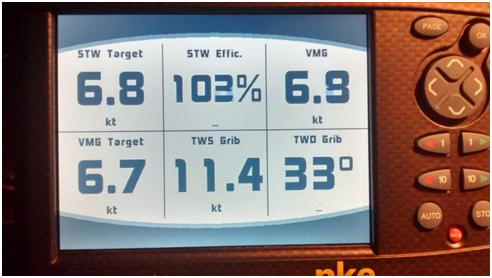
SailGrib can publish back to the NKE bus real time calculated data. These data can be displayed on NKE multifunction displays allowing the crew to have real-time performance data.
Once SailGrib WR is setup, make sure to configure your NKE wifi box and displays to receive these data.
On the wifi box wifi, you may need to make a new NMEA initialization by pressing the Init button for 6 seconds. Refer to the instructions in the wifi box manual.
On your display, it will most likely have to do a new NMEA initialisation, check the NKEuser manual. These procedures have to be done only once.
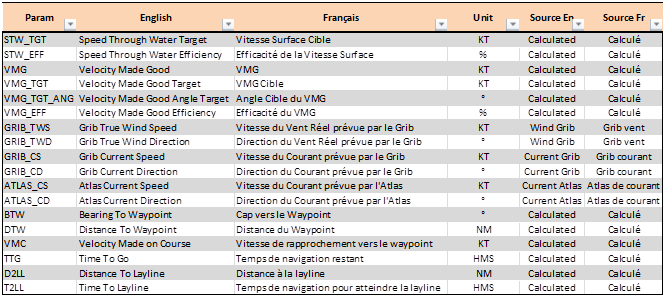
The Multigraphic can receive performance data in a dynamic format. To enable this data feed, go to “NMEA Settings” then “NKE Settings” and check the MuliGtraphic Dynamic Data option. Eight dynamic channels are configurable. For each of them choose to published data from the following list:
Here is a Multigraphic sample screenshot