At sea, the race organization may send files containing the positions of the boats in the race. Two formats are generally used, the Maxsea(or Adrena) format and the Expedition format.
Maxsea and Adrena use the same format. The only difference between Maxsea and Adrena is in the header line. The following lines include a line number, the boat Id in the race, the latitude, the longitude, and the UTC time of the position.
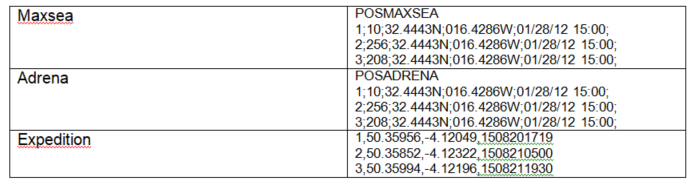
Note that the Maxsea/Adrena file header can also be: POSREPORT
Here again, we will prefer the Maxsea or Adrena format, easier to read with the naked eye.
To load a Positions file into SailGrib, first save the attachment. It will be saved in the Download directory of your Android device, then :
press the Load a position file menu.
Note that :- the name of the active race is displayed under the Edit Race menu.
- The date of the most recent position is displayed under the Load Position File menu.
Choose the file type to load and the date format of the positions
Then choose the position file to load. The most recent file is listed at the top.
When loading:- the position file is moved from the Download directory to the sailgrib/race directory.
- the number of positions found is displayed. Boats may be missing if the position has not been transmitted by the tracking beacon.
- rankings are calculated. Wait until you see the Rankings calculated message before leaving the screen.