ou can display 2 types of roadbooks:
- Directly on the screen: press the button to obtain a synthetic view of the selected routing.
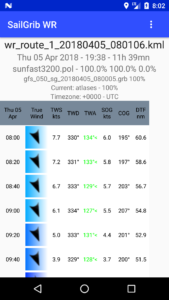
In the menu, go down to the Weather routing section, press the Roadbook button.
The first tab displays global data and some routing statistics:
- Finish time, duration, start time
- Finish and start coordinates
- Distance of the route and average speed over ground
- Rhumb line bearing, great circle line distance and comparison with the distance on the route
- Max, min and average wind speed on the route
- Average true wind angle
- Polar used with its efficiencies
- Wind and Current grib file used
- Land avoidance parameter
- Eventually, mixed routing parameters and time motoring.
- The bottom part of the roadbook lists all the waypoints and the course parameters:
- Start time of isochrone
- Position
- Distance to cover and travel time. This time is generally equal to the routing time step unless you have to make a tack or gybe during this isochrone
- Ground speed and ground heading (SOG/SOG), possibly to engine
- Real wind speed and direction (TWS/TWD), that of the grib file
- Surface wind angle (AWA), calculated from the actual wind from the grib file and modified by the current
- The bottom part of the roadbook lists all the waypoints and the course parameters: