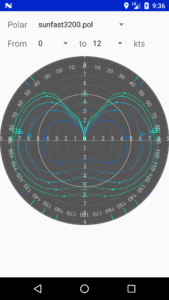
To view a polar:
- open the menu then in the routing section press the Polar button
- Choose the polar to view
- Choose the wind speeds to view
There is no tool in SailGrib WR to edit a boat polar.
Most often, the app is used on a cell phone and it is not a convenient device to edit a large table.
You have 2 options though!
- Use polar efficiencies in the routing menu. This is very easy and efficient.
We have implemented 2 polar efficiency parameters, one for winds under 10 knots and a second one for winds over 20 knots. SailGrib interpolates for wind speeds in between. As most polars are theoretical ones, we recommend to set these parameters to around 85% for cruising boats with a clean hull, not overloaded and with decent sails. - Use the editing tools we have published on our website:
- an Excel sheet
- a Windows program written by Ralph Lechterbeck - Thanks :-)