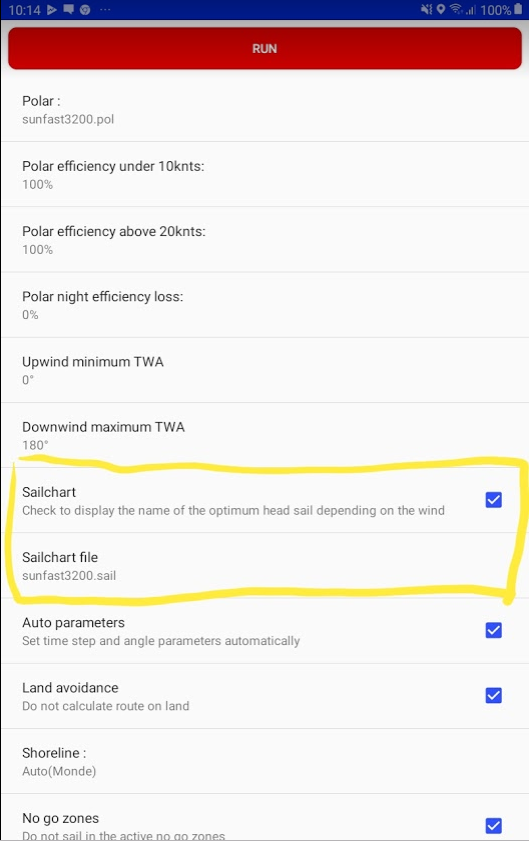
The table representing the SailChart is saved in a text file with a .sail extension whose data is separated by tabs.
The first line starts with  and continues with a list of true wind speeds (TWS)
The following lines start with a true wind angle (TWA) and continue with the list of optimal sails for this TWA
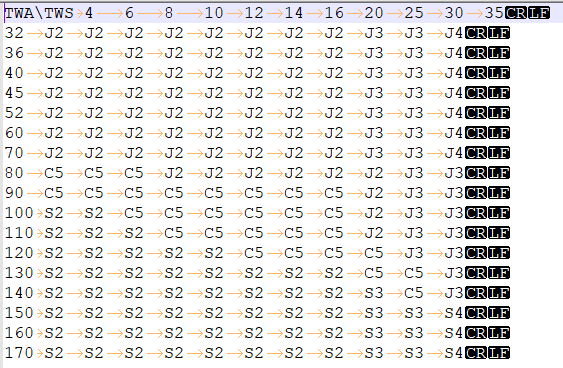
It is relatively easy to modify a SailChart using a text editor.
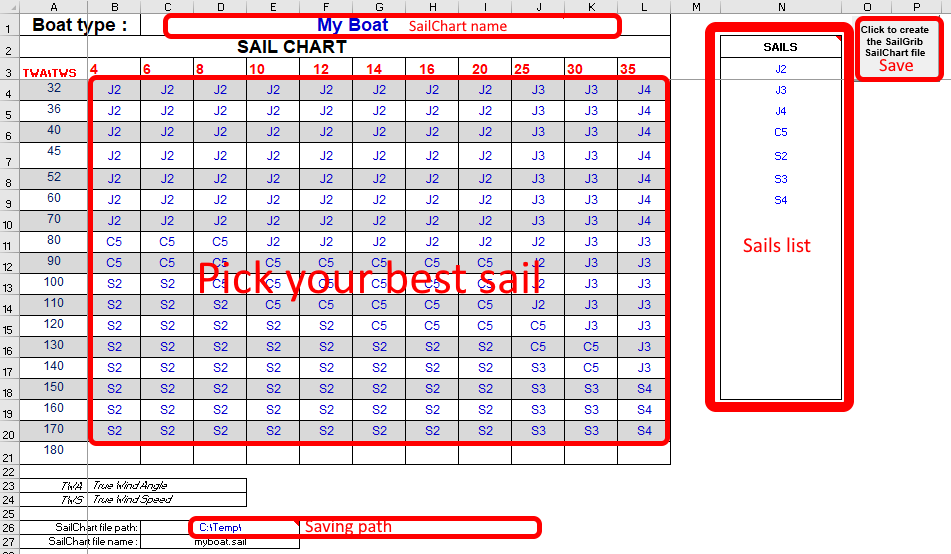
We have made an Excel sheet that allows you to create your own SailChart.
You can download it here.
1/ Create a SailChart
The font color of the cells to be filled is navy blue
- Enter the list of your headsails or spinnakers in the blue range[N3:N18].
The sail in the cell 45°/10 knots represents the optimal sail from 45° of TWA and 10 knots of TWS. - Choose the optimal sail for each cell in the range[B4:L21].
- Enter the name of the sailchart in cell.
- Enter the directory where the sailchart will be saved in cell.
- Click on the button
2/Activate the SailChart in SailGrib WR
- Send you by email the SailChart file you just created
- On your Android device, open the email and save the attachment
- SailGrib WR will automatically copy it on your device into the sailgrib directory, under the sailchart subdirectory
- Select the SailChart from the Routing menu