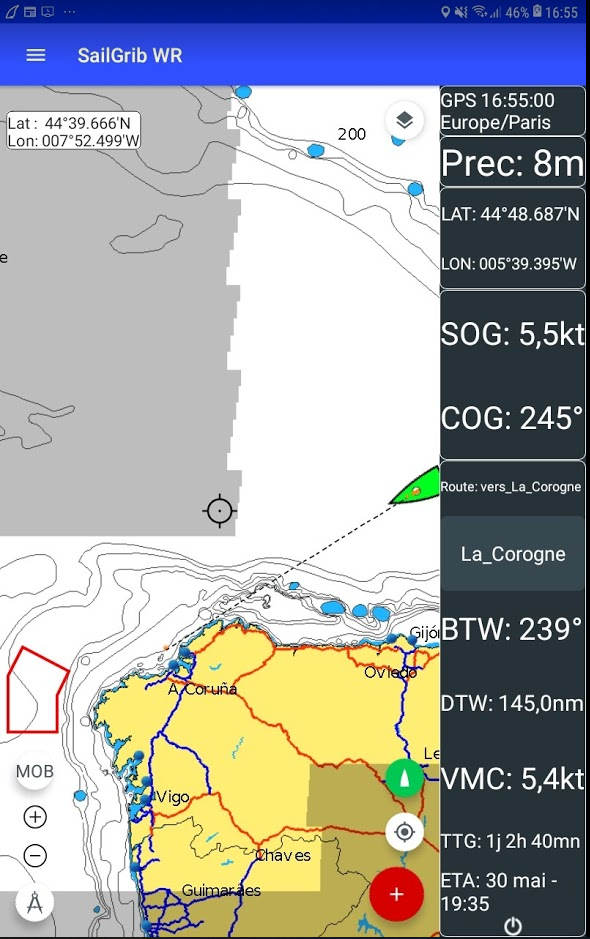
When navigating to a given waypoint, create a mark at that waypoint location and activate it.
The app will give you the basic navigation data:
BTW : Bearing to waypoint
DTW: Distance to waypoint
VMC: Velocity Made on Course, this is the speed of approach to the waypoint
TTG: Estimated sailing time to this waypoint at the VMC
ETA: Estimated time of arrival at the waypoint
1/ Create a Mark:
- if you have checked the option “Waypoint at screen center”:
* center the map on the desired location
* make a long press anywhere on the map
if you have not checked the option “Waypoint at screen center”:
* make a long press at the location where you want to create a waypoint - choose the Manage Marksmenu
- choose the Create a mark option
- enter a name and choose an icon for this mark
- press the Save button
2/ Activate a mark:
- if you have checked the option “Waypoint at screen center”:
* center the map on the desired mark
* make a long press anywhere on the map
if you have not checked the option “Waypoint at screen center”:
* make a long press on the mark you want to activate - choose the Manage Marks menu
- choose the Activate mark option